
Performer eligibility — ATO guidance reviewed 13 October 2026
An ABN, invoice, hobbyist status or retirement does not automatically remove super obligations for individual performers. Check legal liability for the performance payment and any applicable exception. Hot Giggity’s entity setting and invoicing model must reflect the actual engagement; they do not decide legal liability.
Read the eligibility and responsibility guide or the ATO performer guidance (updated 16 September 2026).
Who this is for: Act owners/band leaders and players who perform in groups.
What you’ll learn: How to set up multi-member gigs, choose who invoices whom, and make sure superannuation (SG) is paid correctly to each sole trader’s fund.
At a glance
- Per-person logic: SG and GST are calculated per performer, based on their entity type and labour-only fee (non-labour items like backline hire don’t attract SG).
- Two payment models (you choose per booking):
- Hirer pays players directly (each player invoices the hirer)
- Hirer pays Act Owner → Act owner pays players (hirer pays the act; act pays the lineup)
- Industry-first option: You can keep full act control and have each player invoice the hirer so SG is paid per player, at source. (Details and setup below.)
- Super is shown separately: SG is a non-GST amount and is not included in invoice totals.
Why this matters
A single invoice does not by itself decide who owes each Player’s super. If the Act Owner acts as a genuine agent for the group and that arrangement is understood by the hirer, the principal may owe SG for each eligible Player. If the Act Owner contracts in their own right and separately hires Players, both the hirer’s payment to the Act Owner and the Act Owner’s payments to Players may create SG obligations. Pay required contributions to the relevant funds; do not assume super paid to the Act Owner’s fund satisfies obligations to other Players.
Workflow
Step 1 - Set up your act
- Open your Act profile → General → ensure that the lineup is correct - Duo, Trio, Quartet / 4Piece, etc.
- Go to the Lineup tab
- Add each player/role by clicking + 'Add Performer'
- Add the instrument/skillset (e.g., Vox, Guitar, Bass, Drums)
- Invite players by typing their name in the Search Musician / Performer field. If your player is not yet on the platform, you will be prompted to invite them via email.
- Set default gig fee split for each performer as a percentage or fixed fee amount (you can override this fee per gig).
Each player will need to complete their Profile → Financial Settings → Superannuation (Entity Type, Fund name/product, USI, ABN, Member number, DOB).
You can find more detailed information about this process in this support article.
Step 2 - Choose your invoicing model (per agent/venue)
Hot Giggity supports two models. The selection is not per booking - it’s configured for a specific act with a specific agent/venue and then applies to all future bookings that agent books for that act (including booking requests).
- Default: Act owner invoices the hirer (act owner pays players; SG for eligible players appears under the act owner’s Super I owe).
- Optional (industry-first): Players invoice the hirer (hirer pays each player and their SG directly while the act owner still manages the lineup and splits).
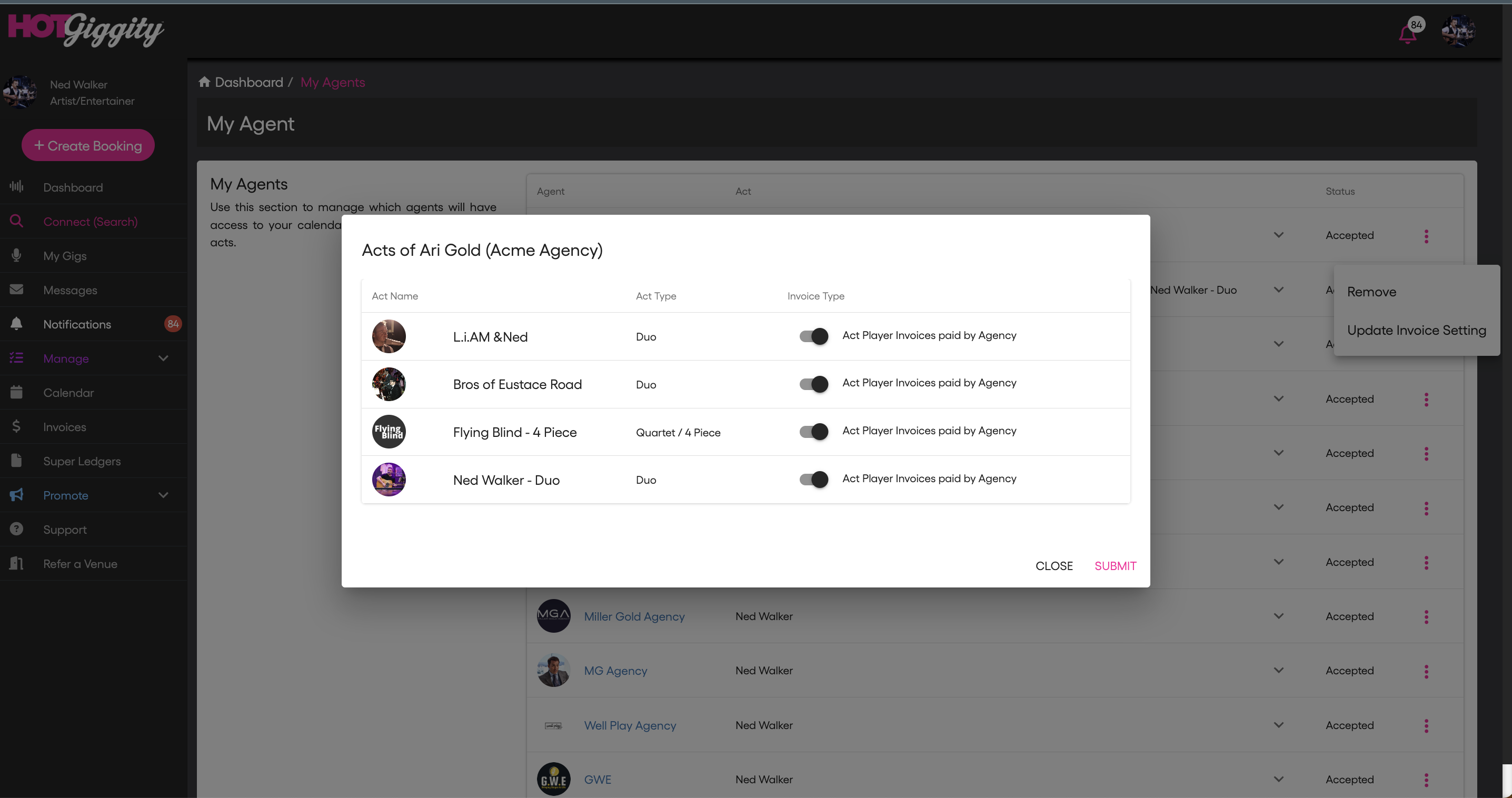
Step 2A - Enable 'Act Player Invoices paid by Agency/Venue' (per act, per agent)
Use this when you want a particular agent/venue to receive invoices from each player for a given act.
- Go to Manage → My Agents / My Venues
- Find the relevant Agency / Venue and click the ⋯ (More) menu.
- In Acts of [Agency] popup, locate the act(s) this agent can book.
- Toggle Act Player Invoices paid by Agency ON for the relevant act(s).
- Click Submit.
Scope & timing
- Applies to all future bookings (booking requests and accepted bookings) created by that agent for those acts after the toggle is on.
- Completed bookings are not changed.
- You can enable it for some agents and not others (per act, per agent).
What happens on each new booking (with player→hirer enabled)
- The hirer (agent/venue) creates the booking for the act and sends it to the act owner.
- The act owner accepts the booking.
- The act owner invites players and sets each player’s gig fee
- If a player has Entity Type = Sole Trader and saved super fund details, Hot Giggity automatically calculates the invoice fee amount and SG amount from the performance fee split.
- Privacy note: Players do not see the overall splits; only the act owner can view them.
- Players accept the booking.
- The hirer receives each player’s invoice, showing:
- Fee (+ GST if registered)
- SG (12%) shown separately for sole traders, to be remitted by the hirer directly to each player’s fund.
Outcome: SG and fees are paid by the hirer, per player, while the act owner retains full control of the lineup, splits, invites, and dependencies.
What happens on bookings with act owner invoices model
- The hirer receives one invoice from the act owner (GST on the fee; no player SG shown to the hirer).
- In the default invoicing workflow, the Act Owner invoices the hirer and the Players’ super appears in the Act Owner’s Super I Owe ledger. Use this allocation only where it matches the confirmed engagement and legal responsibility. A genuine agency arrangement can require different allocations; contact support if the display does not match.
- Players are paid by the act owner, not by the hirer.
Quick checklist before you confirm a band booking
- Personal profile super details updated
- Entity Type set correctly (e.g. Sole Trader / Company / Trust / None-Other)
- Super fund details saved (Fund/Product, USI, ABN, Member No., DOB)
- All players invited & profiles confirmed
- Each player has accepted the invite
- Each player’s Entity Type confirmed
- Sole-trader players have complete super details
- Fees set per player
- Fee set for each player
- Invoicing model set (per act, per agent/venue)
- Choose one: Players invoice the hirer or Act owner invoices
- (If using agents/venues) Act Player Invoices paid by Agency / Venue toggle ON for the correct acts under Manage → My Agents / My Venues → ⋯ → Acts of [Agency / Venue]
Related articles
Need help?
If you have questions about anything in this article, please email - support@hotgiggity.com