
Performer eligibility — ATO guidance reviewed 13 October 2026
An ABN, invoice, hobbyist status or retirement does not automatically remove super obligations for individual performers. Check legal liability for the performance payment and any applicable exception. Hot Giggity’s entity setting and invoicing model must reflect the actual engagement; they do not decide legal liability.
Read the eligibility and responsibility guide or the ATO performer guidance (updated 16 September 2026).
Payday Super update — effective 1 July 2026
For eligible payments made on or after 1 July 2026, pay super each payday. Contributions generally need to reach the worker’s super fund within 7 business days after the related payment, subject to applicable exceptions. Submit promptly and allow for clearing-house processing time.
Quarterly date filters remain useful for reporting and reconciliation, but do not permit you to defer current super payments until quarter-end. Read our Payday Super payment timing guide.
Where to find it: Main Menu → Super Ledgers
The Super Ledgers screen lets you track superannuation (SG) for each gig. There are two tabs:
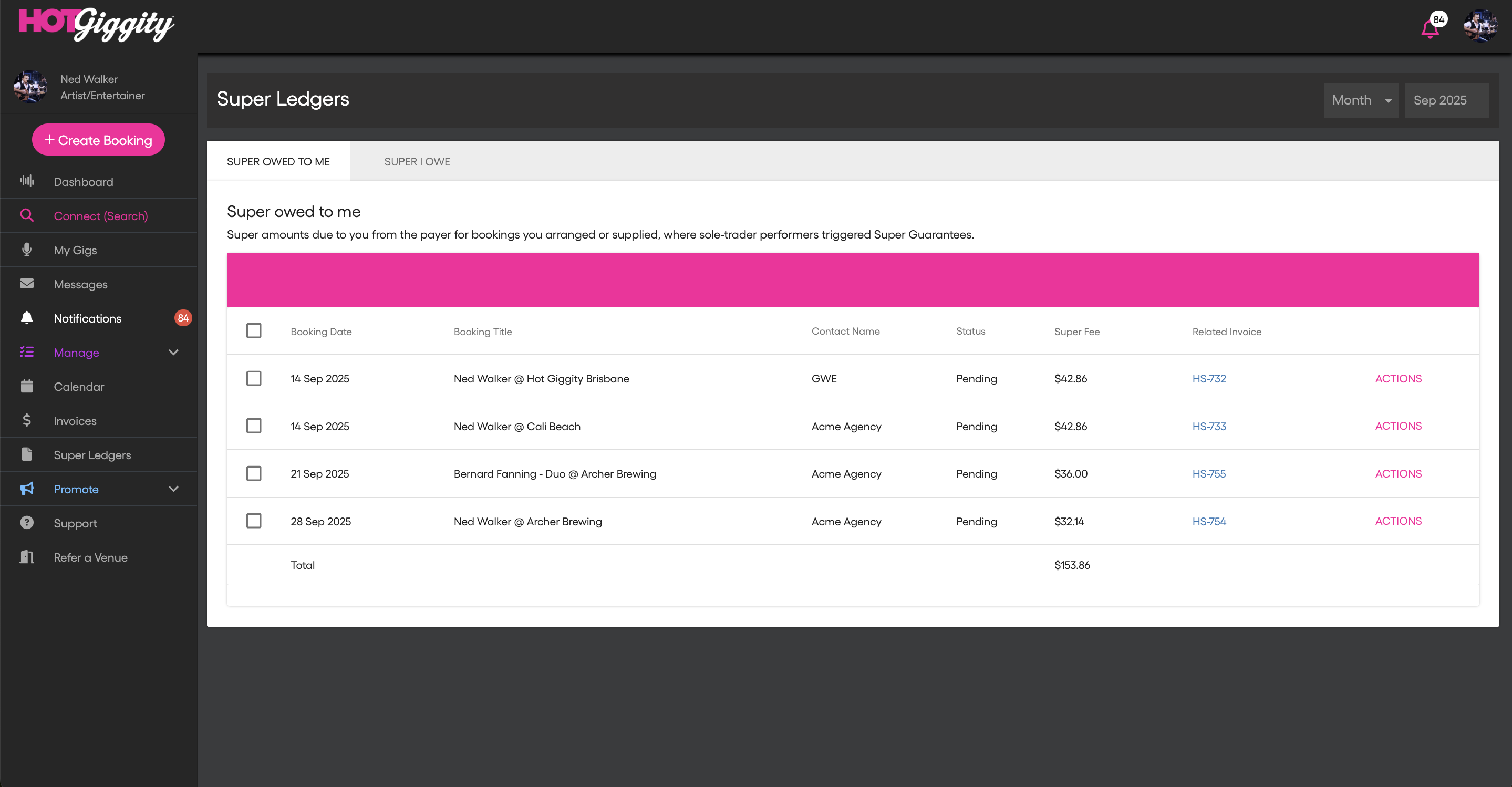
Super owed to me
See every SG contribution others owe you (per gig), who owes it, and the amount.
What you’ll see
- Booking Date & Title — the gig the contribution relates to
- Contact Name — the payer (venue/agent/act)
- Status — e.g. Pending or Paid
- Super Fee — the SG amount for that gig
- Related Invoice — click to open the gig’s invoice
How it updates
- Items appear once the booking is invoiced with SG for a sole-trader artist.
- When the payer marks it paid (or their accounting system sync marks it paid), the Status flips to Paid.
- The Total row gives you a quick sum for the visible period.
Note: SG is shown separately and does not attract GST; invoice totals exclude super.
Super I owe
For act owners who pay sole-trader players/crew directly. Use this tab to manage and record remittances to players’ funds.
What you can do
- Review each player’s SG amount by gig
- Click Mark as Paid once you’ve remitted to the fund
- Use Actions to view the related invoice or booking details
Who sees this tab
- Act owners (or anyone who, for a given booking, is the payer of sole-trader players).
Tips
- Date filter: Use the filter at top-right to switch Month or choose Custom and set a date range. The list and Total update to your selection.
- Payment timing: For eligible payments made on or after 1 July 2026, pay super each payday. Contributions generally need to reach the worker’s super fund within 7 business days after the related payment, subject to applicable exceptions. Submit promptly and allow for clearing-house processing time. Use quarterly filters for reporting only; check individual payment dates when reviewing contributions.
- Missing details: If a gig doesn’t appear, the performer may not have saved Entity Type = Sole Trader or fund details yet. Once saved, future invoices will show SG and entries will appear here.
- Hirer pays players model: If your act is set so players invoice the hirer, each player’s SG sits in the hirer’s ledger; you’ll still see your own SG under Super owed to me.
- Record-keeping: Marking an item Paid on Super I owe is your record that you’ve remitted that contribution to the fund.
Need help?
If you have any questions about this article, please email support@hotgiggity.com.